If the Gatekeeper keeps rebooting it is important to find out what is causing the problem.
Power failure |
The first thing to rule out is power failure, make sure the cable and switch are to the standards described in the chapter on connecting the camera. |
The logs |
In CortexClient in the CortexView of the running cortex the LogAxon shows a log for first aid. This can be inspected at first. Extended logging is available both for the cortex as well as for the Gatekeeper. In CortexClient in the CortexNavigator find the rebooting Gatekeeper. For extended logging about the gatekeeper as a whole right click the name of the Gatekeeper and choose get log. For extended logging about the cortex right click the name of the cortex and choose get log. |
An example |
|
|
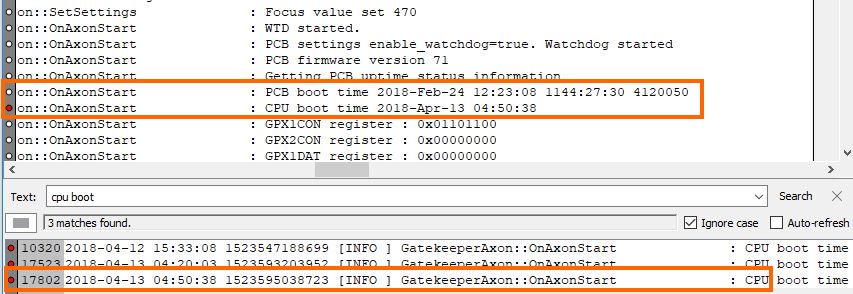
In the log file a search can be performed for 'CPU boot'.
In this example 'cpu boot' has been searched in the text finder, and it has been found 3 times. If clicked on a line in the matches, it will also be shown in the full log text.
By examining the time difference between the time the PCB booted and the time the CPU booted we can deduct that in this case a power failure is not the cause. If the time between the two events would be seconds a power cut or insufficient power supply is most likely the cause.
If a power failure can be ruled out, further investigation is required and the error log must be studied for more information regarding any error messages. |