Following the following steps will most of the time solve any recognition problem.
Check 1: recognition constraints |
To recognize a license plate it's minimum pixel width is 100px. It's maximum is 350px. Bigger or smaller then these constraints license plates will not be recognized properly. To check for the right constraint click here. |
Check 2: lighting circumstances |
Lighting circumstance influence recognition. Still the physical spot to mount a Gatekeeper is an important choice. In winter the sun can be low and the cap is of no help. Pick the mounting position of the Gatekeeper with this in mind.
Another tool to handle different or difficult lighting circumstances is the use of sequences. In the IDSAxon settingspanel the videostream can be splitted in two sequences. For each sequence the exposure and gain can be set seperately.
|
Check 3: Can you recognize the license plate yourself? |
Avutec's ANPR engine can recognize license plates in circumstances the human eye has trouble reading them. When mud is covering a license plate or a screw is deforming the characters a license plate cannot be read. |
Check 4: Watch recognition (use the ANPR inpsection tool) |
|
|
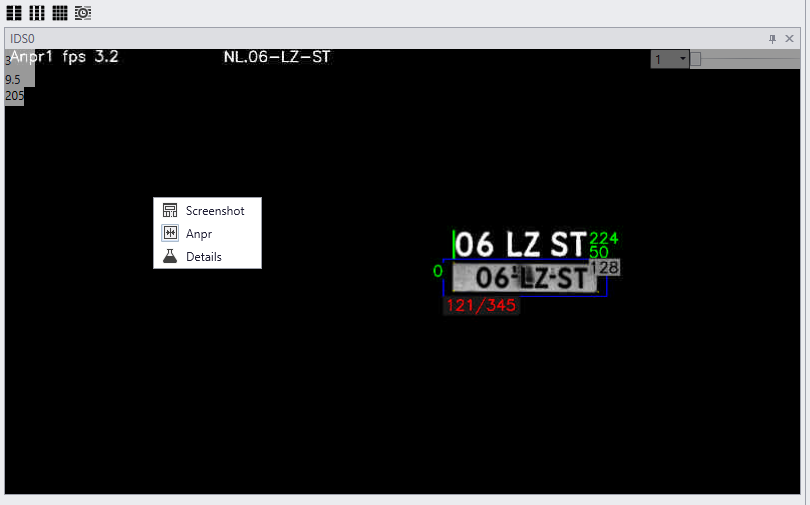
To see what is going wrong recognition needs to be examined. In CortexClient open the CortexView of the Gatekeeper. Open the GatekeeperAxon settings- and viewpanel for live view with recognition information. Right click the viewpanel to enable ANPR mode.
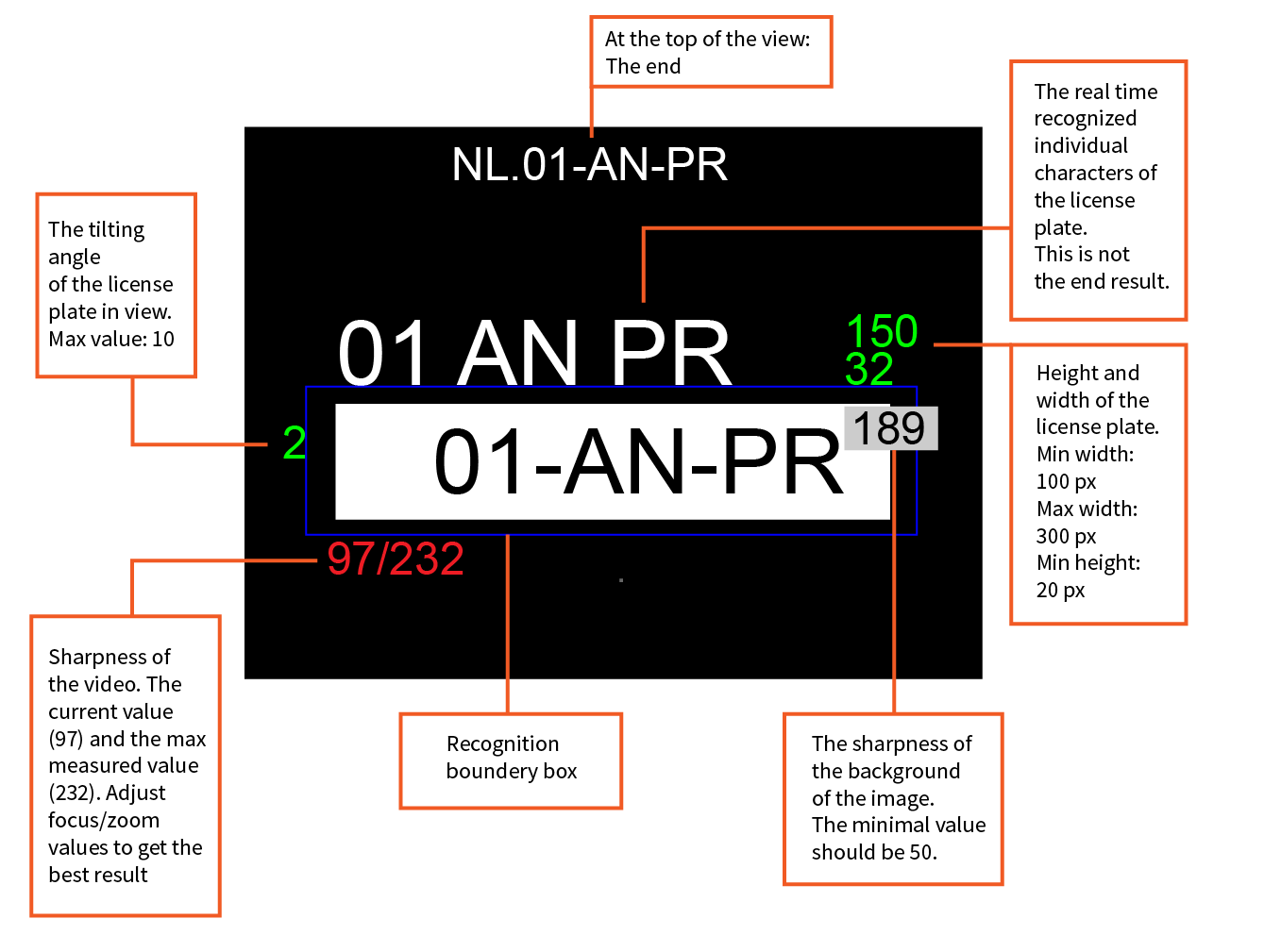
Height and width The top number highlighted in green at the top right corner of the license plate should be anywhere between 100-350 for optimum performance, the bottom number should be higher than 20. If the numbers are out of bounds they will turn red and need adjusting, try to optimize by changing the zoom level.
Tilting The number left of the license plate shows the angle of the license plate in degrees, this should be under 10, again this will turn red if it needs adjusting. In this example the number is 2. 2% tilting.
Focus/zoom The number in red shows that the current zoom/focus level is 97. Zoom/focus can be better here. It can go to 232, the maximum zoom/focus it has measured so far in this image. Zoom and focus can be set manually by moving the sliders in the settingspanel of the GatekeeperAxon. Focus will adjust automatically when zoom is set. After zoom levels are good, focus can be tweaked further if necessary. Another way to set zoom and focus is by dragging a region of interest over the license plate. Zoom and focus will automatically be calculated for this region. Characters Above the license plate the recognized characters are displayed. If they are not there recognition failed.
A diagonal through the license plate
License plate printed on the top of the screen
See optimise ANPR for more details |
|
Check 5: Recording |
With the help of VMS systems recording the Gatekeeper's videostream and making bookmarks when cars are recognized, checking recognition can be less time consuming. |
