In all Gatekeeper-X2 follow below instructions.
As of the Gatekeeper-X3 the VideoSourceAxon is replaced with the ULLAxon.
With the launch of the new ANPR engine in March 2023, the ULLAxon serves as a second feed to the ANPR engine by default. It does not have to be configured.
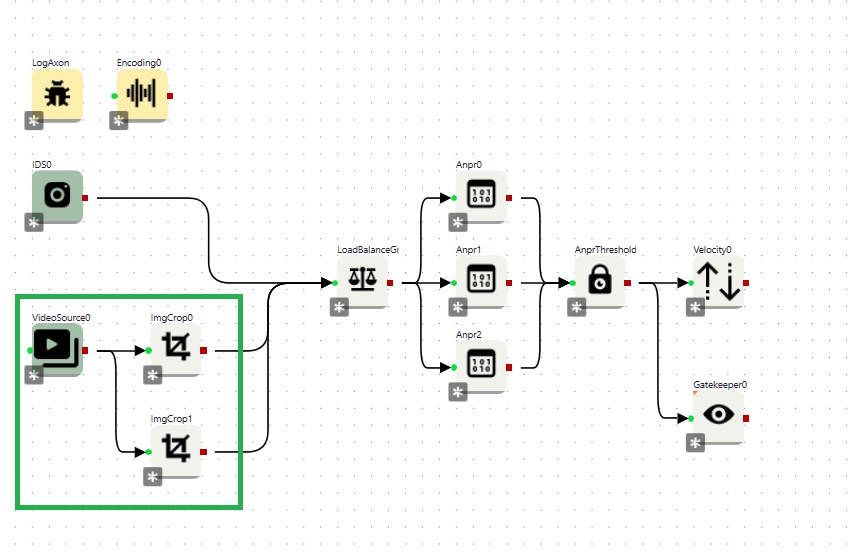
In order to perform ANPR, the VideoSourceAxon must be connected to the LoadBalanceAxon, that is feeding the ANPRAxons in the Cortex (see example Cortex below).
In order to feed the proper images to the ANPR engine and obtain high accuracy levels, the region of interest has to be set.
To select the Region of Interest for the color camera (VideoSourceAxon), the ImgCropAxon is used.
The ImgCropAxon is responsible to select/crop a part of an image used in for instance two lane recognition.
The ImgCropAxon does not change the settings of the sensor itself. It crops the images coming from the sensor. The cropped image is send further down the Cortex.
By choosing the proper ROI('s) processing speed of recognition will increase significantly.
In case of multiple regions of interest are required, the VideoSourceAxon needs to be connected with multiple ImgCropAxons (see the design of the Cortex below). One ImgCropAxon can make one crop
1. The design of the Cortex |
|
|
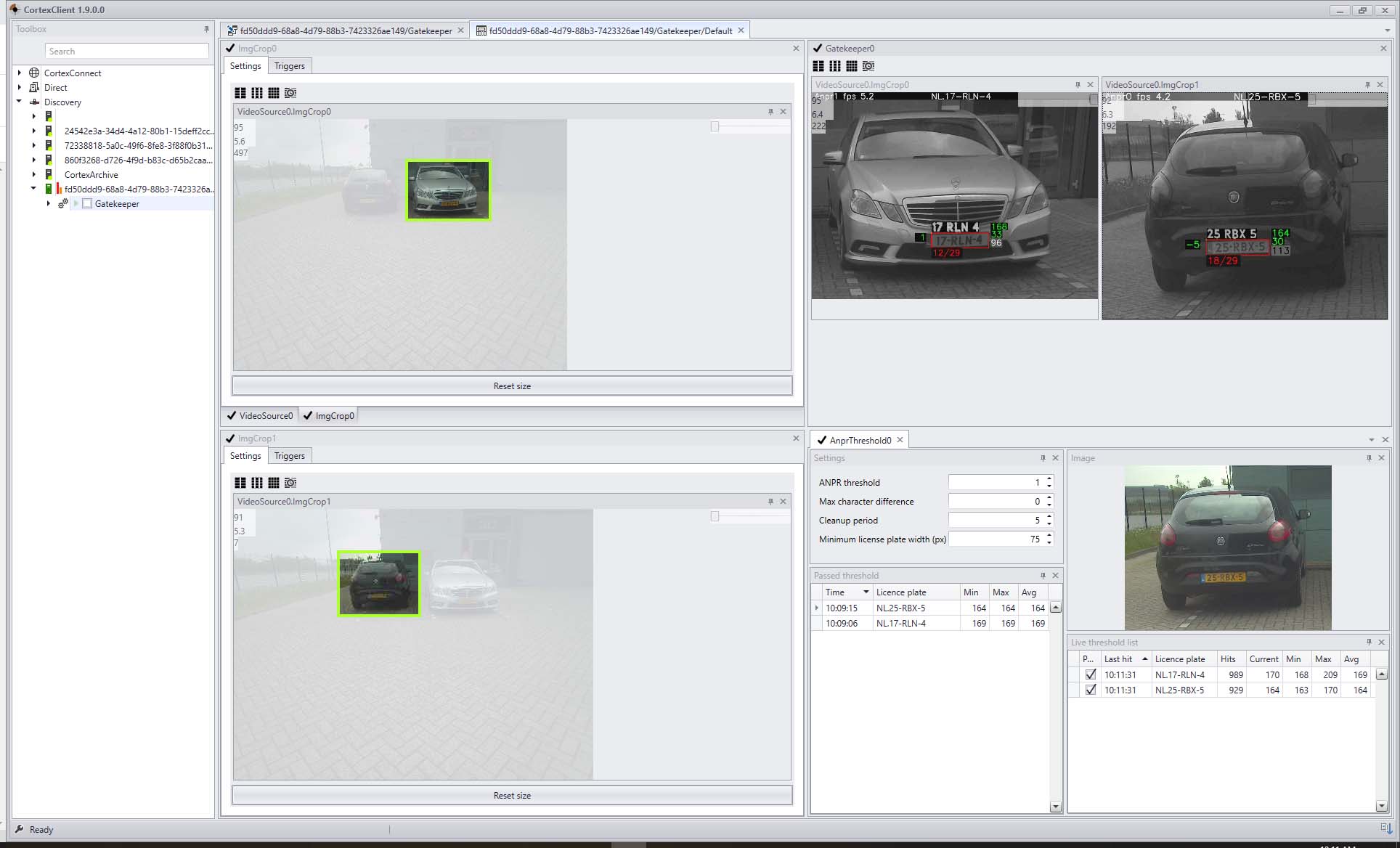
2. The corresponding CortexView and the steps to configure VideoSourceAxon for ANPR |
|
|
1.Depending on the distance set the resolution for the VideoSourceAxon to 4k or HD. Choose the smallest resolution possible in order to obtain the best frame rate. In this example the VideoSourceAxon resolution is set to 4K.
2.In the view two ImgCropAxons (ImgCrop0 and ImgCrop1) viewpanels are seen at the left, each with their own cropped ROI. ** Make the ROI as small as possible still covering the complete recognition area. The smaller the area the faster and more accurate recognition processing will be.
3.The GatekeeperAxon viewpanel (right-top) shows the cropped ROI's with an ANPR overlay. To enable the overlay, right click the image and choose 'anpr'. Read more about the overlay and the meaning of the numbers here. 4.The ANPRThresholdAxon viewpanel (right_bottom) displays hitcount, max and min width of the license plate.
**Crop the imageAn image can be cropped by holding the left mouse button and drag and select the region of interest.
The cropped part of the image will be displayed on its original image position. It will not be resized to fill the panel. This way the exact crop can be seen. A new selection can be made without resetting to its original size.
The ImgCropAxon can only be used for uncompressed images. |