Optimizing the ANPR threshold depends on the situation. It is an important Axon to obtain for optimal recognition results.
To get a practical understanding about the flow of the ANPRThresholdAxon and default settings for various situations read the below.
For detailed information and the settings about the ANPRThresholdAxon follow this link.
All three settings of the ANPRThresholdAxon can improve recognition. Their interdependence must be understood to correctly use them.
Understanding the flow of the ANPRThresholdAxon |
|
|
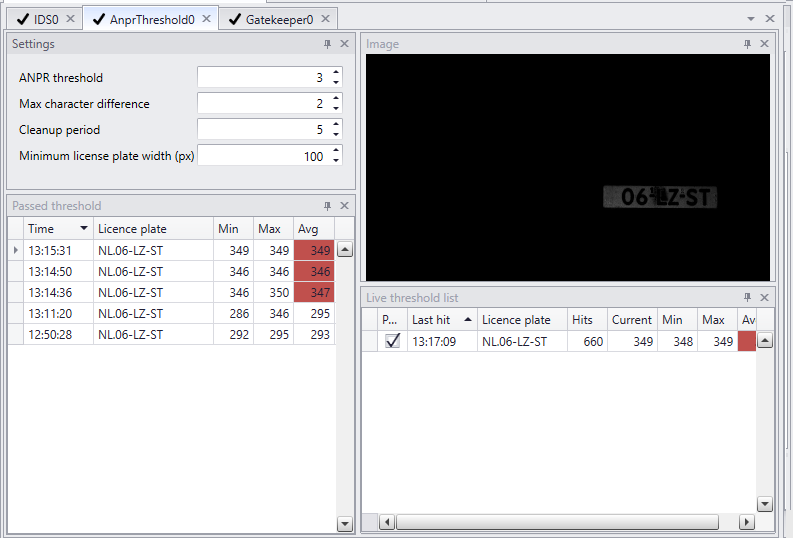
1.All recognition results are displayed on the 'live threshold list' (the right corner of the settingspanel). 2.The hit counter on the 'live threshold list' shows how many hits a license plate had so far. 3.A license plate can be promoted to the 'threshold passed list' (on the left of the settingspanel) when hit count passes the threshold. 4.The hit count of a license plate will still increase, but the license plate will not be promoted again after the threshold is met. 5.After each hit the cleanup period restarts. 6.After meeting the threshold and the license plate being promoted, all new license plates that meet the 'max character difference' criteria will not be promoted during the cleanup period of the promoted license plate. 7.In the live threshold list 'passed' will not be checked for new license plates even when it reaches the threshold. 8.Meanwhile recognition continues. The cleanup period restarts every time a license plate is recognised. 9.When a license plate gets out of scope. Cleanup period will end. The license plate will vanish from the 'live threshold list'. 10.The cycle will start over with a new license plate. 11.The history of passed license plates is seen in the 'Passed threshold' list. |
Threshold |
Threshold settings need to be fine-tuned based on location conditions. If dealing with a situation where accuracy is a top priority, for instance a car-park with access control that deals with a white list, the threshold can be kept higher than in a situation where cars pass at higher speed and only a few frames are available.
|
Max character difference |
Max character difference is kept low (value = 0) when cars are passing at high speed. Max character difference is set higher (value = 2) in a parking, a car wash or other venue, where cars are standing still for a longer period. In order to stop slightly different recognitions of the same license plate to be passed on to a POS or other management system, max character difference can be set to 2. This setting is especially meant to handle license plates that are difficult to read.
|
Cleanup period |
Cleanup period can be low when cars pass at higher speed. Cleanup period can be longer for stationary cars. A longer period makes sure a license plate is not passed on during the cleanup period to an output Axon twice. For instance at a car wash this can be a good choice. Personnel will cover a license plate to prewash the front of a car. As soon as the plate is visible again it will be recognized again. With a longer cleanup period the license plate will not be passed.
|
Default starting values |
||||||||||||||||||||
The following recommended value indicate a starting position. They cannot guarantee desired results as all circumstances are different
|
