The relays of the I/O extender can be used in output and input mode in order to send out or receive information.
Operating a barrier directly
To open a barrier (without a third party access controller) the IO extender has two electronic relays to switch a voltage high enough to open a gate.
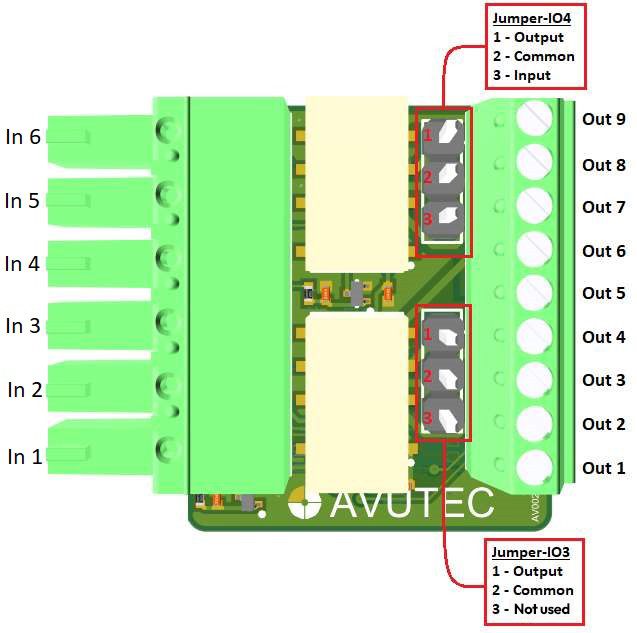
•Relay B (pin Out 4,Out 5,Out 6) and Relay A (pin Out 7,Out 8, Out 9) can be used to operate two individual barriers.
•Set jumper IO3 and IO4 in output mode by connecting pin 2 and 3
In CortexClient, in the GatekeeperAxon, set relay to output mode.
Receiving input
The IO extender can be used to receive DC input signals.
•Set jumper IO4 in input mode by connecting pin 2 and 3.
•Jumper IO3 should always be set to output mode.
•Pin Out 8 can receive max 12 VDC.
•When the input signal >=5.5VDC it is considered high.
•When the input signal <5.5 VDC it is considered low
In CortexClient, in the GatekeeperAxon, set relay to input mode.
