Figure 1: IO extender schematic
The IO Extender V2 can be connected via the input connector (left connector in Figure 1) to the
Gatekeeper. The multiple output functions are presented to the user via the output connector
(right connector in Figure 1).
Depending on the configuration of the Gatekeeper it is connected to there are two jumpers that
need to be set. Setting these jumpers determines if the corresponding IO on the Gatekeepers
port will be used as an output or input. By default, these are both set to output.
IO Extender V2 modules are interchangeable under the condition the jumpers are set to the
configuration of the connected Gatekeeper.
The functions per connector are listed in Table 1-4.
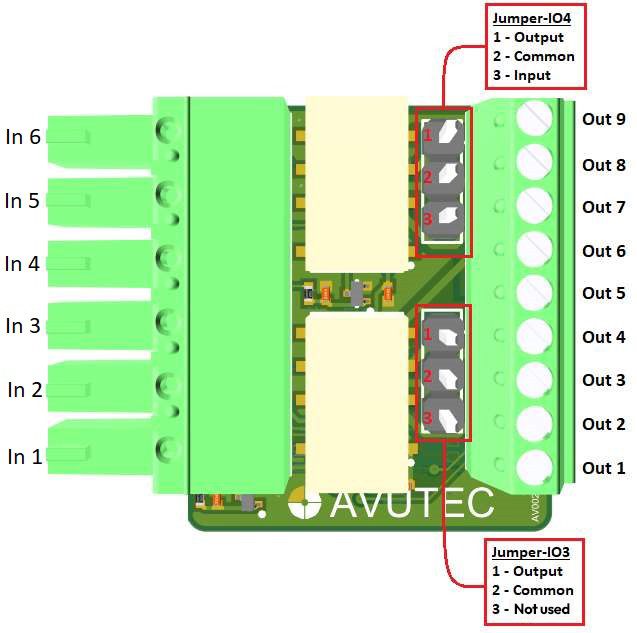
Table 1: Pinout description output connector (right connector in Figure 1)
Pin name |
Primary function |
Alternative functions |
Remarks |
|---|---|---|---|
Out 1 |
GND |
||
Out 2 |
Data 1 |
||
Out 3 |
Data 0 |
||
Out 4 |
Relay B NC |
||
Out 5 |
Relay B COM |
||
Out 6 |
Relay B NO |
||
Out 7 |
Relay A NC |
||
Out 8 |
Relay A COM |
input max 12 VDC, >=5.5VDC=high |
Set jumper IO4 to input mode (see table3 below) |
Out 9 |
Relay A NO |
Table 2: Pinout description Jumper connector IO3
This jumper must always be set on output mode
Pin name |
Primary function |
Alternative functions |
Remarks |
|---|---|---|---|
Pin 1 |
Output |
||
Pin 2 |
Common |
||
Pin 3 |
Input |
not available |
Table 3: Pinout description Jumper connector IO4
Pin name |
Primary function |
Alternative functions |
Remarks |
Pin 1 |
Output |
Connect jumper between this and Common to set Relay A to output mode |
|
Pin 2 |
Common |
||
Pin 3 |
Input |
Connect jumper between this and Common to set Relay A to input mode using pin Out 8 |
