Installing CortexClient
After installing the Module-X properly, it can be (remotely) configured using CortexClient.
If the PoE+ 802.3at switch does not provide for an open internet connection, make sure you are using CortexClient from within the network domain of the user, use a (pre-tested) VPN tunnel connection or CortexConnect, the AVUTEC remote conection service.
CortexClient can be downloaded:
•Download link: avutec.com/support/
•Password: Avutec!
Install CortexClient using the default settings. Check mark launch CortexClient and after installation the application will automatically start showing the login screen.
•username: administrator
•password: cortex
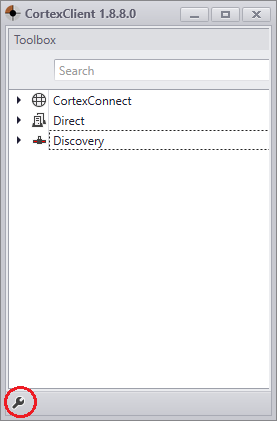
After login, the Client screen will be displayed, with on the left side the CortexNavigator containing the different methods of connecting that are possible.
-CortexConnect
-Direct
-Discovery
Left panel of CortexClient: CortexNavigator
1.Discovery
Devices within the local network will be discovered by a process called Discovery. This will happen automatically.
Read more
2.Direct
A direct connection is ipadress based. To connect Direct port forwarding or additional configuration will be necessary.
Read more
3.CortexConnect
To simplify accessing CortexFramework devices AVUTEC developed CortexConnect. CortexConnect is the AVUTEC remote access tool to connect to devices running CortexFramework without the need for port forwarding, opening firewalls or setting up a VPN connection. A subscription to CortexConnect provides access to this service and allows for a secure connection to all your CortexFramework devices.
Read more