In the Gatekeeper-X3:
The ULLAxon is the Axon that controls the settings of the on board camera of the Gatekeeper-X3, that is used for overview, as an extra source for ANPR or for additional recognition tasks
In the Module-X IR
The ULLAxon is the Axon that controls the settings of both the on board camera's. Meaning that each Cortex will contain two ULLAxons.
Changes are set in the ULLAxon settingspanel. In CortexClient the live view of the sensor is displayed in its viewpanel.
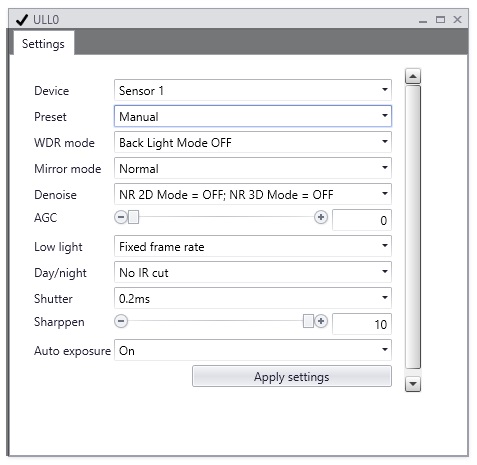
Choose the camera |
|
|
Module-X IR: Each Cortex contains two separate ULLAxons, one for each of the on-board cameras. Select Sensor 1 for the sensor behind the daylight filter. Select Sensor 2 for the sensor behind the transparent window.
Gatekeeper-X3 A Gatekeeper-X3 Cortex can contain only one ULLAxon. The drop box (see orange bounding box) will show one sensor only. Choose this one. I will be called Sensor 1.
Always click "Apply settings" to confirm the changes. |
Presets or manual configuration |
|
|
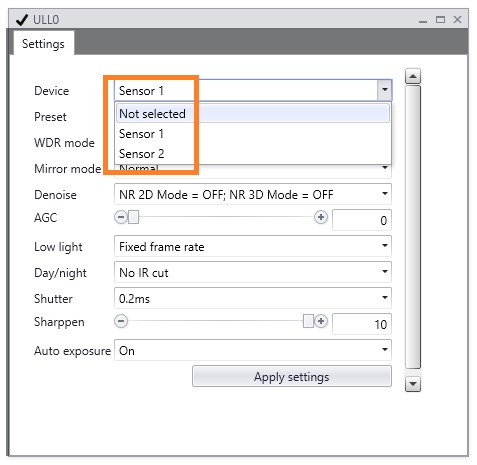
There are two preconfigured settings, that can be used out-of-the box and will give good results in most circumstances. And there is the possibility to choose manual.
IR: Choose this configuration for ULL0 or the ULLAxon that is behind the daylight filter.
Color: Always choose this configuration in the Gatekeeper-X3 In the Module-X IR, choose this configuration for the ULL1 or the camera that is behind the transparent window.
Manual: Choose this option to manually set the configurations of the ULLAxon.
Always click "Apply settings" to confirm the changes. |
Manual configuration |
|
|
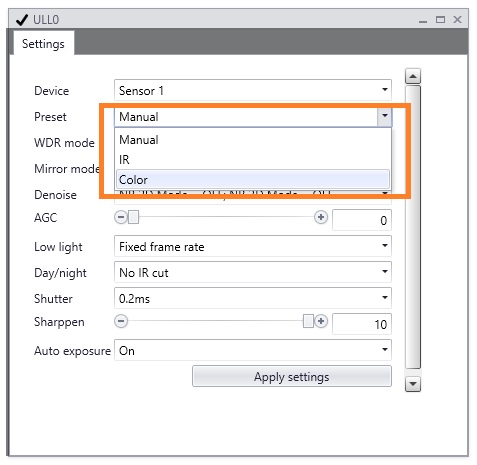
For most installations the presets will give the best results for recognition. They are carefully chosen to obtain the best performance in all weather and lighting circumstances. For some very specific situations the settings must be manually set.
|