In a Cortex the Axons communicate with each other by receiving, passing and sending messages containing MessageInfos.
Every Axon receives messages at which it adds its own specific MessageInfo. The MessageInfos of Axons determine behavior of Axons further in the Cortex.
To be able to customize behavior, Axons have the possibility to use scripting.
Scripting uses the MessageInfos of an incoming message as a trigger to perform project required actions.
Triggers and actions are implemented with the use of ChaiScript.
Open the window to implement a script |
|
|
•The window to implement a script can only be opened in a running Cortex •When not running, right click the Cortex to be adjusted and choose "run cortex". •Open CortexDesigner by right clicking the Cortex and choose "Design Cortex" •Click the lightning icon of an Axon (green bounding box" to open the scripting window. •Below there are two example scripts to implement behavior/functionality. |
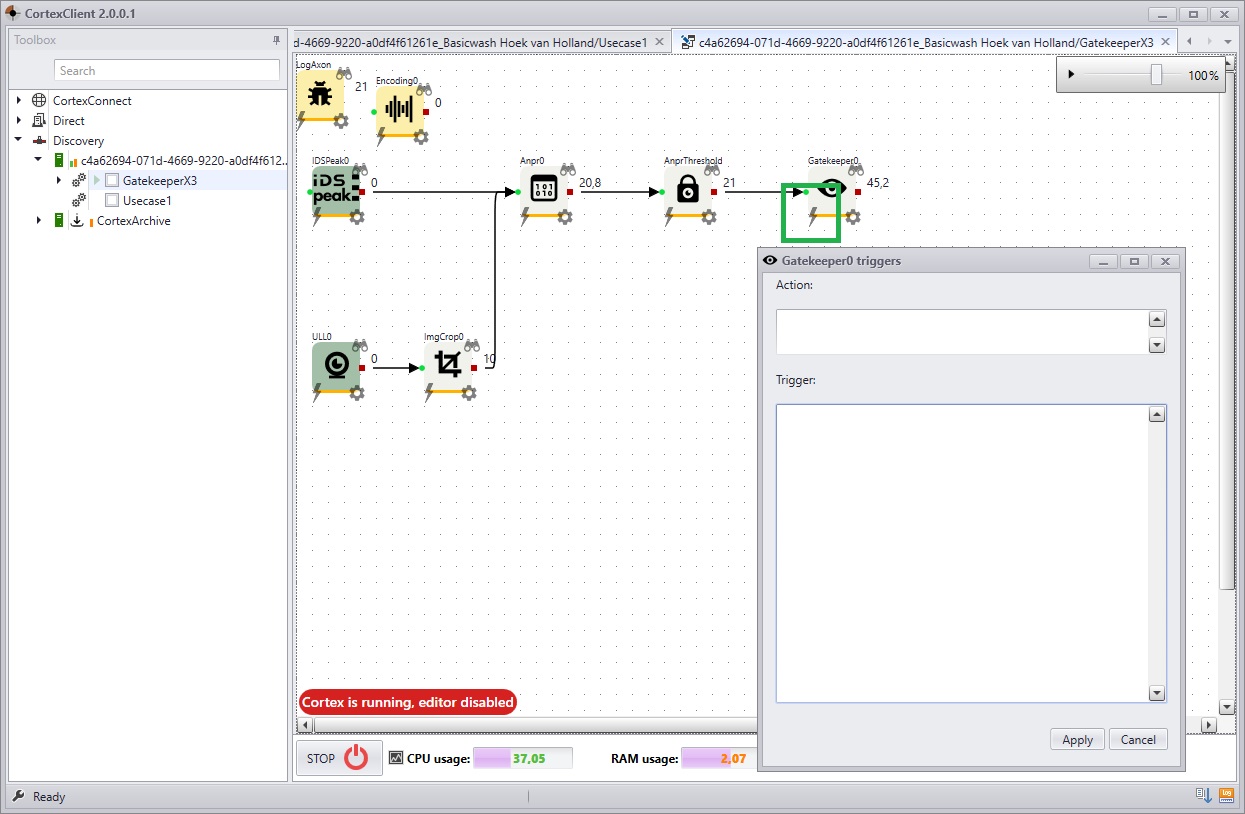
Example 1 |
In the example below the WebServiceAxon checks MSG_IMAGE for MI_ANPR_THRESHOLD. When MSG_IMAGE contains the MI_ANPR_THRESHOLD, the WebServiceAxon makes a POST request to a RESTfull web service using Json representation.
In the example MI_ANPR_THRESHOLD can be replaced for MI_OBJECT_DETECTED or any other MI_INFO. |
Trigger |
Action |
message.Has(MI_ANPR_THRESHOLD) |
auto threshold = PbAnprThreshold(); message.GetMessageInfo(MI_ANPR_THRESHOLD, threshold); auto img=message.GetImage();
for (auto i = 0; i < threshold.license_plates_size(); ++i) { auto anpr_data = PbAnprResult(); message.GetMessageInfo(MI_ANPR_RESULT, anpr_data); auto lp = FindPbLicensePlate(anpr_data, threshold.license_plates(i)); auto j=Json(); j["unit_id"]=HypervisorGuid(); j["timestamp"]=GetUTCString(); j["anpr_path"]=message.LoadBalancePath(); j["license_plate"]=lp.license_plate(); j["country"]=lp.license_plate().substr(0,2); j["confidence"]=lp.confidence(); j["image"]=img; this.Post(this.Url(),j); }
return false; |
Example 2 |
In this example the NxAxon checks MSG_IMAGE for MI_ANPR_THRESHOLD. When the MI_ANPR_THRESHOLD is there the NxAxon adds a bookmark and an event to NxWitness client.
In the example MI_ANPR_THRESHOLD can be replaced for MI_OBJECT_DETECTED or any other MI_INFO. |
Trigger |
Action |
message.Has(MI_ANPR_THRESHOLD) |
auto threshold = PbAnprThreshold(); message.GetMessageInfo(MI_ANPR_THRESHOLD, threshold); auto description = ""; auto tags = "";
for (auto i = 0; i < threshold.license_plates_size(); ++i) { description = ""; tags = threshold.license_plates(i).substr(0, 2); auto lp = threshold.license_plates(i); try { auto car_data = PbCars(); message.GetMessageInfo(MI_CARS, car_data); auto pb_car=FindPbCarData(car_data, lp); description = pb_car.make()+","+pb_car.model()+","+pb_car.color(); tags = tags + "," + description;
} catch (e) { print(e.what()); } try { auto anpr_data = PbAnprResult(); message.GetMessageInfo(MI_ANPR_RESULT, anpr_data); auto kenteken = FindPbLicensePlate(anpr_data, lp).license_plate(); } catch (e) { print(e.what()); }
this.AddBookmark("e06e813a-0eb9-ebeb-ff31-700ae283a350", lp, 2000, description, tags); this.CreateEvent("e06e813a-0eb9-ebeb-ff31-700ae283a350","detection",description); }
|
